
AI in Analytics Engineering: What Actually Worked
- SaaS & Tech
TL;DR
AI cut analytics engineering time roughly 60% on a production financial data migration, 161 dbt models built in 5 months by a team of 4, with 285 commits from the primary developer, but only inside guardrails that took about 2 days to write: a CLAUDE.md file defining architecture rules, hard boundaries on financial-logic changes, and mandatory human review of every pricing calculation. AI excelled at repetitive pattern work (12 regional staging models, schema docs for 80+ models) and consistency, but never made a financial decision, discovered undocumented business rules, or navigated Snowflake and Okta permissions, those stayed entirely human.
Key takeaway — We used AI as a development tool on a production analytics migration handling real revenue data. Here’s an honest assessment: where AI multiplied productivity, where it fell short, and the guardrail framework that made it work safely on financial systems.
What AI Did Well
1. Accelerated Repetitive Pattern Work
The project required 12 staging models — one per cloud region — all following the same pattern with minor variations (different source tables, different region identifiers). AI generated these in minutes instead of hours.
Similarly, creating schema documentation (YAML files with column descriptions and tests) for 80+ models is tedious work that AI handles efficiently.
2. Maintained Consistency Across 161 Models
With a CLAUDE.md file defining naming conventions, architecture patterns, and coding standards, the AI produced code that was stylistically consistent across the entire project. No “different developer, different style” drift.
3. Caught Edge Cases in Financial Logic
During pricing implementation, the AI flagged potential precision issues (FLOAT vs NUMBER types) and suggested explicit casts. It also identified potential fan-out risks in joins that could inflate revenue calculations.
4. Made Documentation Happen
Engineers rarely write documentation voluntarily. With AI assistance, every model got descriptions, every column got documented, and the self-service guides for Finance were drafted and refined iteratively. The documentation that exists for this project wouldn’t exist without AI — not because the team was lazy, but because there were 161 models and one engagement.
What AI Did NOT Do
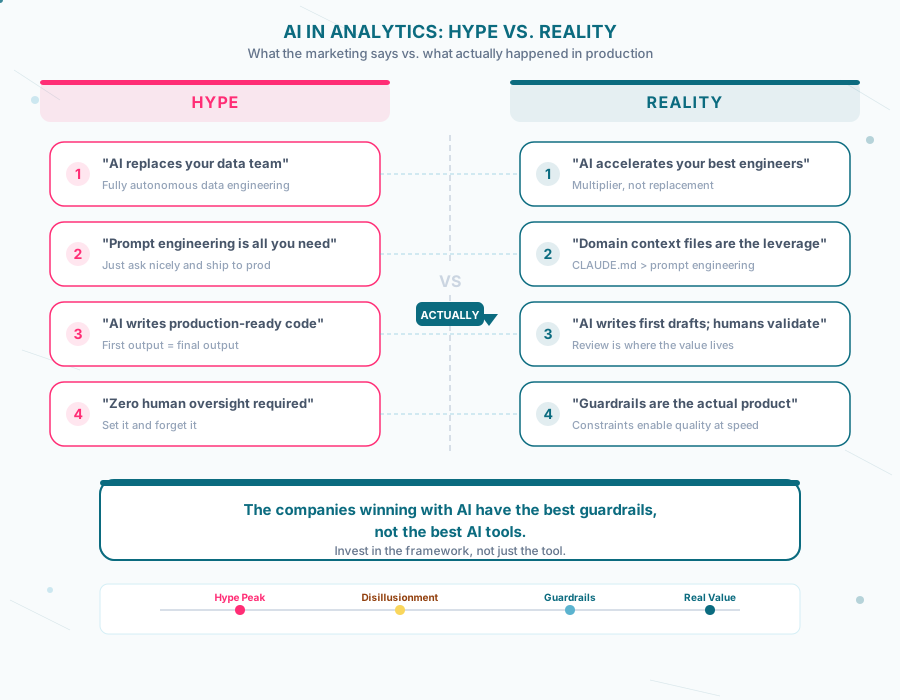
1. Make Financial Decisions
The AI never decided what a pricing rate should be, how a discount should apply, or whether a variance was acceptable. Every financial calculation was proposed by AI, reviewed by a human, and approved by Finance stakeholders.
This was enforced by design — the project’s CLAUDE.md file explicitly prohibits AI from changing financial macros without human approval.
2. Replace Domain Expertise
The AI had no idea that a product category’s pricing changed significantly mid-year because the rate existed in a database, not in any code or documentation. A human had to reverse-engineer the multiplier by comparing legacy and new system outputs.
AI accelerates work within a known domain. It doesn’t discover undocumented business rules.
3. Navigate Organizational Complexity
Snowflake permissions, Okta SSO configurations, GitHub token approvals, role hierarchies — none of this was AI-solvable. The “permission dance” (try → fail → request access → wait → try again) consumed real project time that no AI could shortcut.
4. Run Without Guardrails
Early in the project, without proper constraints, the AI would occasionally suggest running broad dbt commands that could affect production. The solution was explicit guardrails:
- Never run
dbt runwithout--select(limits scope) - Never use FLOAT for monetary values
- Never modify legacy reference code
- Always validate before claiming correctness
Without these rules, AI assistance would have been net negative on a financial system.
The Framework: How to Actually Use AI in Analytics
The CLAUDE.md Pattern
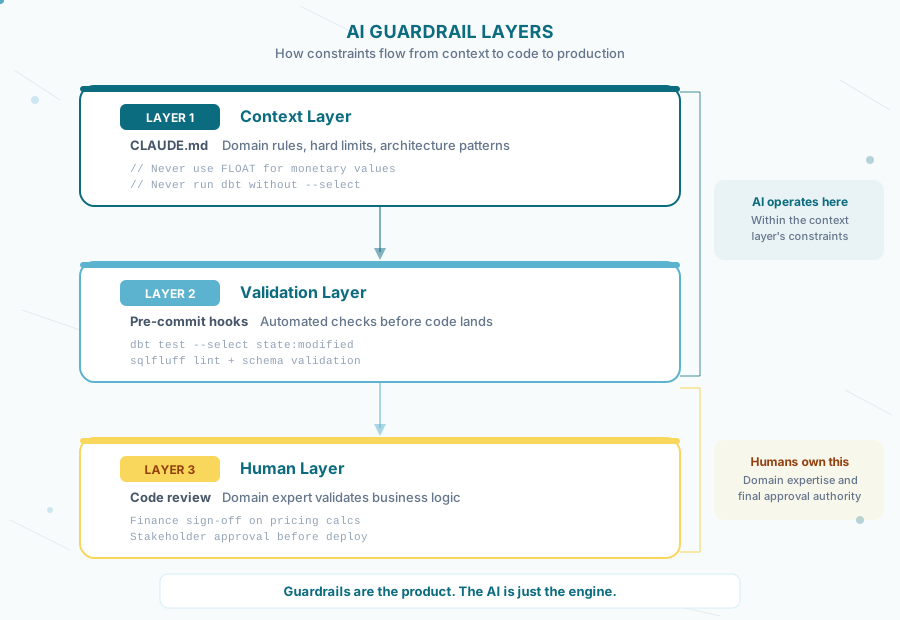
The single most impactful decision was creating a project-level instruction file (CLAUDE.md) that defines:
Architecture rules — where each type of code belongs (staging, intermediate, marts), naming conventions, materialization patterns.
Hard boundaries — operations that require human approval (financial logic changes, production deployments, destructive commands).
Domain context — what the project does, what the data represents, what precision standards apply.
Workflow patterns — how to approach common tasks (migration, validation, testing).
This file serves dual purpose: it constrains the AI during development AND documents institutional knowledge for human team members. When the contractor left, the team had everything needed to continue — both with and without AI assistance.
The Guardrail Investment
Time spent writing guardrails: ~2 days across the project. Time saved by AI across 5 months: significant — 285 commits from the primary developer over 5 months points to a velocity that wouldn’t have been possible without it.
The ROI on guardrails isn’t just safety — it’s quality. Constrained AI follows patterns. Unconstrained AI guesses. On a financial system, the difference matters.
What Executives Should Ask Their Teams
1. “What guardrails are in place?”
If the answer is “we’re just using the AI tool as-is,” that’s a risk. Especially on financial systems. Every project should have documented constraints.
2. “Who approves AI-generated financial logic?”
There should be a human in the loop for any calculation that affects revenue, billing, or compliance reporting. “The AI wrote it and it passed tests” is not sufficient approval.
3. “Is the AI making us faster, or just busier?”
AI can generate code quickly. But if that code needs extensive review, debugging, and rework, the net velocity gain may be smaller than it appears. Measure cycle time, not just output volume.
4. “What happens when we turn off the AI?”
If the codebase only makes sense to the AI that wrote it, you have a dependency problem. Well-structured AI-assisted code should be readable and maintainable by humans. Documentation, naming conventions, and clear architecture matter more with AI, not less.
5. “Are we using AI where it has leverage?”
AI excels at: repetitive patterns, documentation, code consistency, test generation. AI struggles with: undocumented business rules, organizational navigation, precision-critical financial decisions.
Deploy it where it has leverage. Don’t force it where it doesn’t.
What This Project Actually Showed
161 models in 5 months with a team of 4. That velocity wouldn’t have been possible without AI. But it also wouldn’t have been possible without clear architecture patterns, explicit guardrails on financial logic, human review of every pricing calculation, and the organizational navigation that no AI can automate.
The companies getting real value from AI in analytics aren’t the ones with the best tools. They’re the ones who invested in the framework first — the guardrails, the documentation, the domain expertise that tells the AI what to do and what not to touch.
The tool is a multiplier. What it multiplies is whatever you already built.
The engagement that produced this assessment is documented in the Revenue Analytics Migration case study — the same project where AI reduced analytics engineering time by 60% on production financial data.
Evaluating AI for your data team? We can help you separate what works from what’s marketing. Let’s talk.
Frequently asked questions
Does AI actually speed up analytics engineering on financial data?
Yes, but only with guardrails in place. On a production financial data migration, AI cut analytics engineering time by roughly 60%, helping a team of 4 build 161 dbt models in 5 months, with 285 commits from the primary developer. It excelled at repetitive pattern work, like generating 12 regional staging models and schema documentation for 80+ models, and kept code style consistent across the whole project. Without guardrails constraining what it could touch, the same tool would have been a liability rather than a multiplier on a system handling real revenue data.
What is a CLAUDE.md file and why does it matter for AI-assisted analytics engineering?
A CLAUDE.md is a project-level instruction file that defines architecture rules (where staging, intermediate, and mart models belong), hard boundaries (operations requiring human approval, like financial logic changes or destructive commands), domain context, and workflow patterns. On this project it took about 2 days to write and became the single most impactful decision: it constrained the AI during development and also documented institutional knowledge so the team could continue the work, with or without AI, after the original contractor left.
What tasks is AI actually good at in analytics engineering?
AI is strongest at repetitive pattern work and documentation: generating near-identical staging models across regions, writing schema YAML with column descriptions and tests for dozens of models, and maintaining stylistic consistency across an entire codebase when given clear conventions to follow. On this project, AI produced 12 regional staging models in minutes instead of hours and drafted documentation for 161 models that likely wouldn't have been written otherwise, not because the team was lazy, but because there was too much surface area for one engagement.
What can't AI do in analytics engineering, even with good tooling?
AI never made a financial decision, like what a pricing rate should be or whether a variance was acceptable, and it had no way to discover an undocumented business rule, such as a pricing rate that existed only in a database with no code or documentation behind it. It also couldn't navigate organizational complexity like Snowflake permissions, Okta SSO configuration, or GitHub token approvals. Every financial calculation AI proposed still needed human review and Finance sign-off before it shipped, and the project's CLAUDE.md explicitly prohibited AI from changing financial macros without approval.
What guardrails should a financial data team put on AI coding tools?
Four rules proved essential on this project: never run dbt run without --select, so a command's scope is always limited; never use FLOAT for monetary values, to avoid precision errors; never modify legacy reference code; and always validate results before claiming correctness. These were written into the project's CLAUDE.md alongside a hard rule requiring human approval for any financial logic change. Without constraints like these, the team found AI would occasionally suggest broad commands that could affect production, constrained AI follows patterns, unconstrained AI guesses.
How do you know if an AI-assisted analytics team is actually safe on financial systems?
Ask four questions: what guardrails are documented, who approves AI-generated financial logic, whether AI is making the team faster or just busier (measured by cycle time, not output volume), and what happens if the AI is turned off, since code that only the AI understands is a dependency risk. If a team's answer on guardrails is "we're using the tool as-is," that's a risk, especially on systems handling revenue, billing, or compliance reporting, where a human needs to be in the loop on every calculation.