
Finance Self-Service: Sigma Input Tables + dbt Seeds
- SaaS & Tech
- Finance, Fintech & Investment

TL;DR
A cloud security company's Finance team went from filing Jira tickets that took up to two weeks to change a single pricing rate, to editing pricing directly in Sigma and seeing it reflected within an hour — no engineering involvement. The solution moved through three stages over three months: hardcoded SQL macros, then CSV seed files (still requiring git access), then Sigma input tables wired to dbt seeds with dropdown validation sourced from seven live dimension tables. The hardest part wasn't the Sigma interface — it was untangling pricing data from calculation logic inside Jinja macros so a non-technical edit couldn't corrupt production.
Key takeaway — A cloud security company’s Finance team was filing Jira tickets to change a single pricing rate — two weeks of waiting for one CSV row. We built a three-stage solution: hardcoded macros → CSV seeds → Sigma input tables with dropdown validation. The result: Finance edits pricing directly in Sigma, requests a dbt run, and verifies in the same dashboard. Engineering is out of the loop entirely. The hard part wasn’t the tooling — it was getting the data model clean enough that a non-technical edit couldn’t break production.
They looked at us like we’d performed a miracle.
It wasn’t a miracle. It was a Sigma input table wired to a dbt seed, four dropdown-validated columns, and a workflow that took three months to build right. But from the finance team’s perspective, the experience genuinely was: open dashboard, edit a cell, pricing is updated.
No ticket. No PR. No waiting.
The ticket problem
At a cloud security company, pricing changes required a developer to edit SQL macros. Not because anyone wanted it that way. It’s just where the system had landed after five years of incremental growth.
The earliest macros looked like this:
{% macro calc_node_amount(node_quantity, period, plan_name) %}
case
  when {{ plan_name }} = 'Product-A-tier' and {{ period }} < '2023-04-01' then
    cast([rate_v1] as number(38, 9)) * cast({{ node_quantity }} as number(38, 9))
  when {{ plan_name }} = 'Product-A-tier' and {{ period }} < '2024-01-01' then
    cast([rate_v2] as number(38, 9)) * cast({{ node_quantity }} as number(38, 9))
  when {{ plan_name }} = 'Product-A-tier' then
    cast([rate_v3] as number(38, 9)) * cast({{ node_quantity }} as number(38, 9))
end
{% endmacro %}
Every rate change was a deployment. Every regional multiplier adjustment was a PR. A 118% undocumented price increase had been applied at the database level with no git record. The most important business logic was either buried in macros or invisible.
Finance couldn’t update anything without filing a ticket. And the engineering team was fielding pricing questions when they had infrastructure to run.
The full story of migrating this codebase covers the technical migration. This post covers the piece that made Finance go from frustrated to fully self-sufficient: the input table pattern.
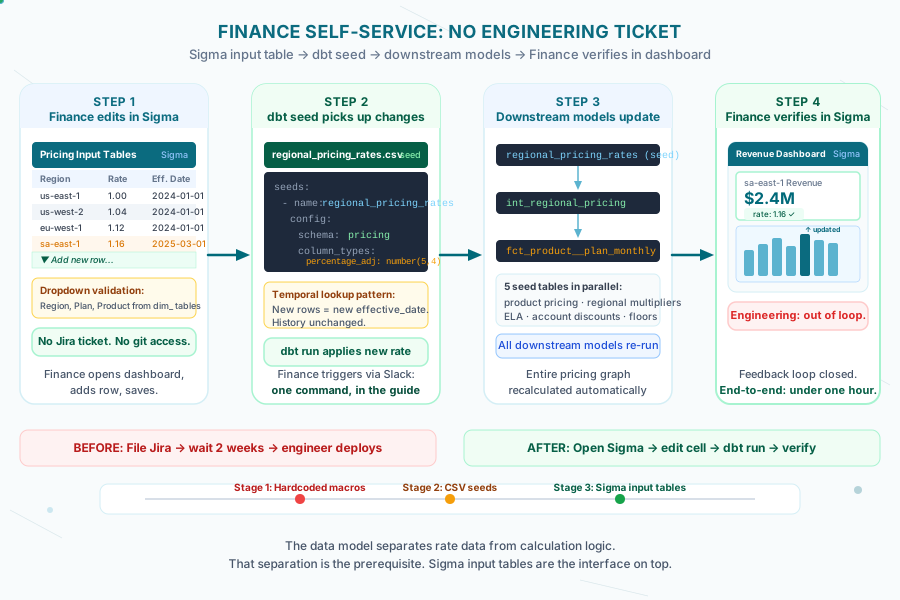
The evolution: three stages
We went through three distinct approaches before landing on something Finance would actually use.
Stage 1: Hardcoded macros. Any rate change required developer time, a PR, and a deployment. Zero self-service. Not viable long-term.
Stage 2: CSV seed files. We extracted all rates into five CSV files — product pricing, regional multipliers, ELA discounts, account discounts, quarterly floors. A real improvement. Finance could edit a spreadsheet. But they still needed to commit to GitHub, which meant git access and git training. In practice, a developer was still in the loop.
Stage 3: Sigma input tables. Finance edits directly in the Sigma dashboard they already use. Zero code interaction. The workflow is: edit in Sigma, request a dbt run, verify in Sigma. Engineering is out of the loop entirely.
That last step — removing git from the workflow — was the design decision that made this actually work. Not the tooling. The removal of a step.
How Sigma input tables work with dbt seeds
Sigma’s input tables let you create editable spreadsheet-like surfaces inside a dashboard. Users can add rows, edit cells, and save changes — all through the Sigma UI. Those changes write back to a Snowflake table.
The dbt side reads from that table as a seed source. When the Finance team updates a pricing rate in Sigma and a dbt run executes, the new rate flows through the entire downstream model graph automatically.
Here’s the seed configuration for the regional pricing table:
# seeds.yml
seeds:
  - name: regional_pricing_rates
    config:
      schema: pricing
      column_types:
        region: varchar(50)
        percentage_adj: number(5,4)
        effective_date: date
        notes: varchar(255)
Explicit column types matter here. Without them, Snowflake’s type inference will turn "1.16" into an integer and truncate leading zeros from account IDs. The Finance team edits the values; the schema contract prevents silent corruption.
The dbt model consuming this seed uses a temporal lookup pattern — no end dates, just ORDER BY effective_date DESC LIMIT 1 — so Finance can add new rows to update rates without deleting old history:
-- int_regional_pricing.sql
select
    usage.account_id,
    usage.product,
    usage.billing_period,
    usage.gross_usage,
    rates.percentage_adj as regional_multiplier,
    usage.gross_usage * rates.percentage_adj as adjusted_revenue
from {{ ref('stg_usage') }} usage
left join {{ ref('regional_pricing_rates') }} rates
    on rates.region = usage.region
    and rates.effective_date <= usage.billing_period::date
qualify row_number() over (
    partition by usage.account_id, usage.billing_period
    order by rates.effective_date desc
) = 1
Adding a new regional rate in Sigma adds a new row with a new effective_date. All historical calculations stay unchanged. All future calculations use the new rate. No engineer needed.
Dropdown validation: the detail that makes it safe
Giving Finance a free-form editable table would be worse than a CSV — at least with CSV review, an engineer would catch a typo before it reached production.
The solution is dropdown validation. Every column that references a dimension — product, region, plan, account — is constrained to a dropdown list in Sigma. The dropdown values are pulled directly from the actual pipeline data.
Seven dimension tables power the validation:
| Table | Values |
|---|---|
dim_regions | 11 cloud regions (exact slugs matching billing data) |
dim_products | 7 product lines |
dim_plan_names | Product-A-tier, Platform, Product-B-tier, ALL |
dim_segments | Internal, External POC, External Upside, Unknown |
dim_accounts | Account ID + display name |
dim_product_categories | Detection, Observability, All |
dim_plans | Observability, Detection, Platform |
These dimensions materialize as tables and auto-update on every dbt run. When a new product launches, dim_products updates automatically, and the dropdown in Sigma reflects it on next run. No configuration change required.
Finance can’t type “us-sout” instead of “us-south”. They can’t enter a plan name that doesn’t exist. The dimension tables enforce referential integrity without a database constraint — because the constraint lives in the UI where they’re actually working.
The Finance workflow: what it actually looks like
We wrote a three-layer guide for the Finance team. Not a technical runbook — a practical workflow with copy-paste commands for the one code interaction they still need.
Layer 1 — Quick reference:
| What to update | Where to edit | Where to verify |
|---|---|---|
| Product pricing rates | Pricing Input Table (Sigma) | Revenue Dashboard |
| Regional multipliers | Regional Input Table (Sigma) | ARR by Region |
| Account discounts | Account Discount Table (Sigma) | Account Detail |
| ELA quarterly floors | ELA Payments Table (Sigma) | ELA Compliance |
Layer 2 — Step-by-step (example: add a new account discount):
- Open Pricing Input Tables in Sigma
- Navigate to the Account Discounts tab
- Add a new row: select account from dropdown, select product category, enter discount percentage, set effective date
- Save
- Request a dbt run (one command, provided verbatim in the guide)
- Open the Account Detail dashboard in Sigma and verify the new rate is applied
Layer 3 — Validation queries:
Finance can run four pre-written SQL queries directly in Sigma to verify their changes took effect:
-- Verify discount application
select
    account_id,
    applied_discount_pct,
    discount_source
from {{ ref('fct_account_discounts') }}
where account_id = '{{ account_id }}'
order by effective_date desc
limit 1
This matters more than it sounds. Finance had previously submitted tickets and waited for engineering to confirm the update worked. Now they can verify it themselves, in the same tool where they made the change. The feedback loop closed.
One timing detail Finance needed to know
Monthly and quarterly models behave differently, and this confused the Finance team until we documented it explicitly.
Monthly models include the current month immediately — a pricing change on March 15 appears in March revenue on the next dbt run.
Quarterly models exclude the current incomplete quarter — a Q1 change won’t appear in Q1 numbers until Q1 is complete. This is by design: incomplete quarters produce misleading ARR figures.
Without this explanation, Finance would update a rate, run a validation, see no change in the quarterly ARR dashboard, and assume something broke. We put this in the guide with a specific example. After that, no confusion.
What this actually changed
Before this pattern, the Finance team filed Jira tickets for pricing updates. The tickets sat in a backlog behind infrastructure work. A regional multiplier change for the São Paulo region — one row in a CSV — could take two weeks to reach production.
After: the Finance team updates pricing in Sigma, requests a dbt run via Slack, and verifies in the dashboard. End to end, under an hour.
The revenue analytics migration case study covers the full scope of what this project delivered. The self-service layer was one of its outcomes.
The thing I keep coming back to is that the hardest part wasn’t building the Sigma interface or wiring the dbt seeds. It was getting the data model clean enough that a non-technical edit couldn’t corrupt production. Rate data and calculation logic were tangled together inside Jinja macros — inseparable. You can’t surface business-owned data in a UI until the code treats it as data, not logic. That separation took months. The Sigma tables took days. The timeline reflects what was actually hard.
Frequently asked questions
How do you let a Finance team edit pricing without giving them database or code access?
Wire a Sigma input table — an editable spreadsheet-like surface inside a dashboard — to write back to a Snowflake table that a dbt seed reads from. Finance edits a cell in the dashboard they already use daily, requests a dbt run, and the new value flows through the entire downstream model graph automatically. No git access, no SQL, no PR. In one implementation this took a rate change from up to two weeks (filed as a Jira ticket) down to under an hour end-to-end, with Finance verifying the result in the same dashboard.
What stages did the pricing self-service system go through before it worked?
Three stages over roughly three months. Stage 1 was hardcoded SQL macros — every rate change needed a PR and a deployment, zero self-service. Stage 2 moved rates into CSV seed files, an improvement, but Finance still needed git access and training to commit changes, so a developer stayed in the loop. Stage 3 replaced git entirely with Sigma input tables that write directly to a Snowflake table dbt reads as a seed — the design decision that actually made it work was removing the git step, not the tooling itself.
How do you stop a non-technical user from entering an invalid value in a self-service pricing table?
Constrain every column that references a dimension — product, region, plan, account — to a dropdown list in the UI, with values pulled directly from the pipeline's own dimension tables (in one build, seven tables covering 11 cloud regions and 7 product lines). Because those dimension tables auto-update on every dbt run, a newly launched product appears in the dropdown automatically. The user physically cannot type an invalid region code or a plan that doesn't exist — the constraint lives in the UI they're already working in, not in a database rule they could bypass.
Why does explicit column typing matter in a dbt seed used for Finance-edited pricing data?
Without explicit column types, Snowflake's type inference can silently corrupt Finance-entered values — for example turning the string 1.16 into an integer and dropping the decimal, or truncating leading zeros from an account ID. Declaring exact types (varchar, number(5,4), date) in the seed configuration means the schema itself prevents this class of silent corruption, so Finance can edit values freely without an engineer reviewing every change for type-inference errors.
How do you let Finance update pricing without losing historical accuracy?
Use a temporal lookup pattern instead of overwriting values: every rate row carries an effective_date, and the model selects the most recent row as of the billing period using a QUALIFY ROW_NUMBER() ordered by effective_date descending. Adding a new regional rate in the dashboard just adds a new row — all historical calculations stay unchanged because they still resolve to the rate that was effective on their date, and all future calculations pick up the new rate automatically. No deletion, no coordination, no risk of losing rate history.
Why do monthly and quarterly pricing dashboards behave differently after a Finance-made rate change?
Monthly models include the current, in-progress month immediately, so a mid-month rate change shows up in that month's numbers on the next run. Quarterly models deliberately exclude the current incomplete quarter, because showing a partial quarter would produce misleading ARR figures — so a rate change made partway through a quarter won't appear in quarterly numbers until the quarter closes. This is expected behavior, not a bug, but it needs to be explained to Finance explicitly or they'll assume the change didn't take effect.